

131·
10 months agoBut did he also order 160k meatgrinders to give to their mothers on the next mother’s day?
But did he also order 160k meatgrinders to give to their mothers on the next mother’s day?

Right, so scale is limited to a wafer. Which probably makes sense because the super high resolution does not make sense for larger panels.
The article indeed shows/mentions a fabrication method with lithographic techniques. The question then is, can that technique scale to larger monitors or is that limited (by wafer size) to small screens, like those for VR-goggles? Perhaps the super high resolution does not even make sense in larger screen applications like monitors. That would require assembly of several ‘chiplets’ at great precision… probably cost prohibitive.
Ok, so is there a pick and place machine that can place these accurately at scale?
So let me get this straight, news was removed because the source website is made using a framework/stack that cán be used to write blogs? Wow. Better block Al Jazeera, its website is using Wordpress headless CMS.

Counting 9:
https://lemm.ee/post/59609761 in News on lemmy.world (archived NYTimes) https://lemm.ee/post/59609758 in World News on lemmy.world (archived NYTimes) https://lemmy.wtf/post/18687996 in World News on lemmy.world (NYTimes) https://lemm.ee/post/59602266 in World News on lemmy.world (CNBC) https://lemmy.world/post/27449187 in Europe on feddit.org (NYTimes) https://lemmy.world/post/27449188 in Economics on lemmy.world (CNBC) https://lemmit.online/post/5503734 in World News on lemmit.online (CNBC) https://lemmy.zip/post/34983571 in World News on quokk.au (CNBC) https://lemmy.wtf/post/18680610 in Economy on lemmey.world (CNBC)
This is the main issue I have while using Lemmy for a few weeks now. Echo chambers really become each other’s echoes. The amount of deja vu ‘news’ that I have already seen a week ago from another community on another instance is too high. The same discussion goes on repeat. Feels like going in circles.
For those concerned about the ‘Signal leak’; Signal did not leak anything, Vance et al. screwed up their user access management.
Budget wise I found an interesting offer with Meteor Lake (U9 185H). For low load work like browsing it’s fast yet efficient enough with the E-cores in use, even when multitasking and many tabs. For more demanding sustained workloads you need to be plugged in for best performance anyway. The thermals are not the best though; a thin and light laptop with 1 fan and Intel chip that’s not the most efficient > RPM increase / thermal throttling.
I bet you’re right. Luckily I am tech savvy and aware of the ARM software compatibility attention point. While picking a new laptop that was 1 of 2 main reasons to go for the Intel Core U9 based Zenbook 14 instead of Asus’s Snapdragon X Elite offering. (it also had a 60Hz and 1200p display instead of a 3k 120Hz one) Sadly their 14 inch models only come with Intel chips, or I would’ve chosen AMD. Still, battery life during browsing on the sofa is great and I don’t have to worry about compatibility issues.

Zen looks nice and some of the UX concepts (workspaces, glance, split sidebar from vertical tabs) work well. The ‘fit & finish’ and the way changes are pushed (unilaterally? Unvalidated with endusers?) feels very much like a 1 man hobby project though.

Canonical Ltd. Is registered in London, England. How is that a US organisation?
Pardon my ignorance, but why yet another fork? Aren’t there already hardened distributions suited for government use? To me the hard part seems to be the services needed for enterprise mgmt; software provisioning, policies, user acces mgmt, auditing/compliance scanning. Perhaps a good idea to look at parties that can also offer ‘corporate’ support at scale. https://ubuntu.com/gov perhaps?
Yup dumdum, I’ve tried to explain that Zen also has this expanding ‘thing’, but unlike with Firefox it can be placed opposite side of the vertical tabs. If you for instance press Ctrl+B and you get the expanding thing (sidebar) with bookmarks. Just like in Firefox it expands and reduces webpage space. The overlay is something else, called the web panel. Something Zen introduced which is additional to the sidebar and not a replacement of it. I’ve even taken the time to show it in a screenshot, but apparently that makes me a smartass.

Can also try Here Wego. It looks a bit more polished and I have better success using its search function. Only downside: spoken navigation instructions are TTS only and sound quality is bad over Android auto…but I have them disabled anyway.

Yes, but a bad example of one very quickly heading towards autocracy. Some characteristics like screwing up your own economy and blaming ‘the foreigners’ rings a distant bell.

The Tesseract web app does that. It stacks posts in the feed that have the same url or title.
A popup is overlay / in front of your viewport or UI, the sidebar is not in front of it. If what you see is (like a) popup, you’re talking about the web panel, which a different concept Zen added. Indeed in Firefox the vertical tabs are part of the sidebar and thus they can’t be move independently. In Zen, the vertical tabs are NOT part of the sidebar, and thus you can move the sidebar to the right while the tabs remain on the left.
It’s configurable from the sidebar dropdown menu, e.g. when opening your bookmarks (Ctrl+B):
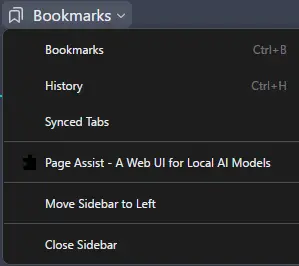
But you can also use this about:config setting:
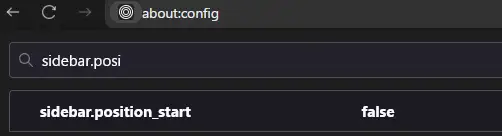
Again you keep calling it a popup, but it really isn’t. It does not pop up or overlay the browser viewport, it sits on the right and pushes the viewport left reducing its width.


Please tell my neighbour with his 4m99cm (barely legal) van/truck… if I’m parked front side first (charge port to my shed) and he parks opposite side of the lot I can’t even get out.